
Summary
A working prototype lets a shopper browse 120 real Vestiaire Collective jackets by talking: say what you want, see three big picks, say "next" to move on, and narrow down by voice until the right jacket is on screen.
It runs on Gemini Live with function calling. The same nine tools are also exposed through WebMCP, so a browser agent can drive the exact same rail a person drives by voice.
The bet is that pre-owned luxury is a browse-heavy, filter-heavy experience. Voice turns ten taps of faceted filtering into one sentence like "black leather, women's, under 600", and keeps the screen for looking at jackets rather than controls.
Experience
The screen is built around one rule: three jackets lead, ten more wait quietly behind them.
- Opening: the assistant greets the shopper, says 120 pre-owned jackets are on the rail, and asks what they are looking for. The three most-liked jackets show while they think.
- Three dominant, ten in reserve: results show as three large numbered cards (photo, brand, colour and style, size, condition, price). Under them, a dimmer strip previews the next ten, numbered 4 to 13, with a count of how many more follow.
- Next, next, next: "next" or "more" moves forward three at a time, "back" returns. The arrow keys do the same.
- Show six: "show six" switches to six featured jackets in a 3 by 2 grid; "show three" switches back.
- Refine: the core of the experience. "Only black", "under 400", "women's", "cheaper first", "drop the colour" each adjust the current results without starting over. Every active filter appears as a hang-tag chip that can also be tapped to remove.
- Open and save: "tell me about number two" (or any number in the strip) opens a detail panel with seller description, size, condition and a link to the real listing. "Save it" adds it to a saved list that "show my saved ones" brings back.
- Captions: the assistant's spoken reply is shown as the large headline; the shopper's words appear under it. A small trace in the corner shows each tool call and whether it came from Gemini Live, a WebMCP agent or the local parser.
With no API key, a type box drives the same tools through a small keyword parser, so the whole flow can be demoed silently.
Example conversation
Seven turns take the shopper from 120 jackets to one €158 Mimi Liberté leather jacket. These are real results from the test run in offline mode; with Gemini Live the spoken wording differs but the tool calls and screen are the same.
| Shopper says | Tool call | On screen |
|---|---|---|
| "Find me a black leather jacket" | search_jackets (type: leather, colors: Black) | 13 matches; The Frankie Shop €336, Giorgio Armani €252, Saint Laurent €837 |
| "Under 600" | refine_results (max_price: 600) | 12 matches |
| "Next" | next_page | Jackets 4 to 6: Schott €246, Arte €158, Kapital €515 |
| "Only women's" | refine_results (gender: women) | 3 matches |
| "Cheaper first" | refine_results (sort: price_low) | S Oliver €40, Mimi Liberté €158, The Frankie Shop €336 |
| "Tell me about number two" | open_item (position: 2) | Mimi Liberté black leather jacket, €158, size S, never worn with tag |
| "Save it" | save_item | Saved list shows 1 |
Architecture
Every action goes through one registry of nine tools, so voice, typing and browser agents all change the screen the same way.
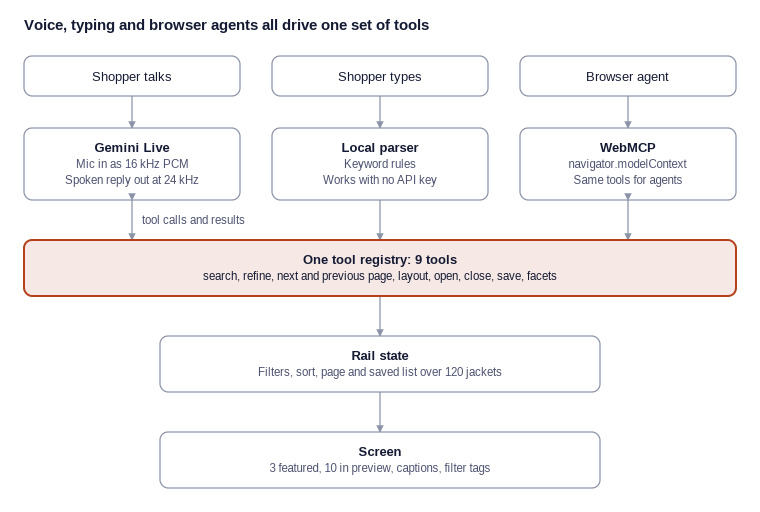
Gemini Live and WebMCP send tool calls and get results back; the local parser only fires calls. The registry updates the rail state, and the screen redraws from it.
- Gemini Live: a raw WebSocket to Google's Live API. Session setup carries the system prompt, the nine function declarations, a voice, and input and output transcription. Mic audio is downsampled in an AudioWorklet and streamed as 16 kHz PCM; the reply plays back with barge-in support.
- WebMCP: each tool is registered with
navigator.modelContext.registerToolusing the same JSON schema and handler. - Single file: one HTML page with the catalog and photos embedded, no build step and no backend.
Tool reference
Nine tools cover the whole experience; each returns the count, the featured jackets and the active filters so the model can answer in a sentence.
| Tool | Shopper says | What it does |
|---|---|---|
search_jackets | "Find me a leather jacket" | New search; replaces all filters. Takes query, type, material, colors, brand, gender, size, condition, min_price, max_price, saved_only, sort |
refine_results | "Only black", "under 300", "drop the colour" | Adds or changes filters on the current results, or removes them by key |
next_page | "Next", "more" | Moves forward by the page size (3 or 6) |
previous_page | "Back" | Moves back one page |
set_layout | "Show six" | Switches between 3 and 6 featured jackets |
open_item | "Tell me about number two" | Opens the detail panel for a numbered jacket, rail or strip |
close_item | "Close", "back" | Returns to the rail |
save_item | "Save it" | Saves or unsaves a jacket; persists in the browser |
get_facets | "What else is in here?" | Styles, colours, brands, materials and price range in the current results |
Catalog data
The rail holds 120 real, unsold jackets, 60 men's and 60 women's, pulled from Vestiaire Collective's public search on 12 Nov 2026 with German locale and euro prices.
- Source: Vestiaire's search endpoint sits behind Cloudflare; a Firefox-fingerprinted client got through where a plain request and a headless browser were blocked. 240 listings were fetched and the first 60 per section kept.
- Fields kept: brand, colours, size label, condition, price in euros, likes, seller description (trimmed to 260 characters), listing URL and the first photo.
- Photos: resized to 420 px and embedded in the page, about 2.7 MB in total, so it runs without network access to Vestiaire.
- Normalised by keyword rules: style (puffer, leather, fur, blazer, gilet, denim, shearling, rain, bomber, field and others; 27 fall back to plain "jacket") and material (wool 23, leather 19, down 16, cotton 16; 9 unknown). Some will be wrong because they are read from free-text descriptions.
- Mix: Moncler is the most common brand; black is the most common colour (70 of the wider 180-item pull).
How to run it
Serve the folder from localhost; the microphone and WebMCP both refuse to run from a double-clicked file.
- In the vestiaire-voice folder, run
python3 -m http.server 8080. - Open http://localhost:8080 in Chrome.
- Click Connect voice, paste a Gemini API key from Google AI Studio and pick a voice. The default model is gemini-3.1-flash-live-preview; Find live models lists every Live model the key can use.
- Allow the microphone and talk. Tap the mic to mute; End voice closes the session.
- For WebMCP, use Chrome 146 or later with chrome://flags/#enable-webmcp-testing turned on (or the Chrome 149 origin trial). The header shows how many tools registered.
From the browser console, vestiaire.run('refine_results', {max_price: 300}) calls any tool directly.
Status and next steps
The whole flow works in offline mode; the live Gemini voice session is built but has not yet been run with a real API key.
- Run a live session with a Gemini key and tune the system prompt on real speech (paging, refining, numbered picks)
- Replace the browser-held API key with ephemeral tokens minted by a small backend before sharing the demo
- Swap the static snapshot for live Vestiaire search so stock and prices are current; the tool layer stays the same
- Improve style and material tagging, which comes from keyword rules on seller descriptions
- Extend beyond jackets to a second category to test how the tools generalise